I Knew State Management Was a Mess. I Shipped It Anyway.
My “state management” was a Vue reactive() singleton, four random localStorage keys, and a prayer. I shipped it on purpose. With three widgets, Pinia felt like over-engineering. With eleven, I was no longer comfortable with that level of technical debt. v0.4.1 is me finally paying down the principal.
If you got bit by the v0.4.1 upgrade and didn’t export first, your layouts aren’t gone — the app just stopped looking at the old key. There’s a full recovery procedure (desktop and iPad both) in the project docs.
The actual problem: you can’t debug a state that doesn’t exist
The old setup was unobservable because most of my “state” wasn’t state at all — it was ephemeral events flying between widgets with no source of truth left behind.
Picture this: you click a ticker in a scanner widget that’s linked to a chart widget. The chart doesn’t update. Why?
In the old architecture, there was nothing to look at. The event had already fired. Whatever the chart did or didn’t do with it lived only in the chart’s local memory. No store to inspect. No log to replay. No reconciliation if a consumer missed the message. Just… nothing.
In Pinia, that same broken link can be debugged with Vue developer tools. The bug doesn’t hide anymore.
The lesson, broader than this project: if your bugs can’t leave tracks, you have a problem.
Why I shipped a breaking change on purpose
The price of the storage rewrite: every existing dashboard layout gets reset on upgrade. No automatic migration.
I could have written a migration shim. I chose not to. We’re still in v0.x.x — the part of the version number that exists specifically so I’m allowed to do exactly this. Better to take the small pain now than to carry a compatibility scar through every future release.
(Confession: this should have been a minor bump, not a patch. Brain fart. Semver discipline matters even when you’re the only user, because Future You is also a user and Future You is not paying attention.)
The 1-second habit that saved me from myself
Here’s the part that’s actually useful: export before every upgrade.
The dashboard has a 📤 Export button that dumps your entire state — layouts, defaults, column counts, the works — into a single JSON file. The export format is the import format. No conversion, no ceremony.
I built that button months ago for exactly this kind of scenario and it worked perfectly when I needed it the most.
What actually shipped in v0.4.1
Audio alerts. Day one result? I stopped glancing at the dashboard every few seconds and just traded. That’s it. No more eye-darting between the chart and the scanner to see if a new HOD printed or an article dropped. The sound tells me. I look when there’s something to look at.
It was a green day. So were the four before it. I’m not going to pretend the feature made me money — it didn’t. I just like it.
The Range Alerts widget and the News Feed widget each got per-instance alert config: an enable toggle, a sound picker with live preview, and dedupe logic so the same event doesn’t bark at you twice. The rewrite made it cheap to build. The audio alerts feature is the obvious win. Tying it all together is the new Global Alert Manager — a bell icon in the dashboard header that opens a panel showing master mute, the global default sound, every active alert config at a glance, and a running log of recent alerts. One place to see everything that’s making noise and why.
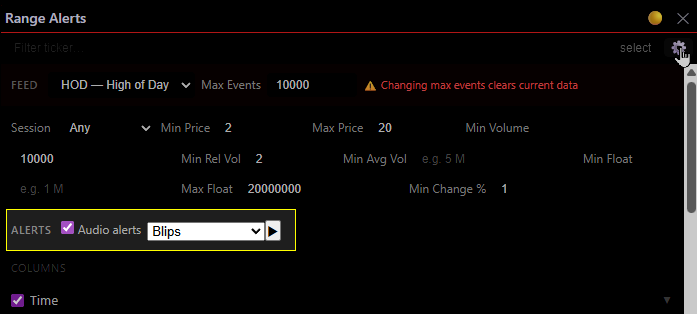
Screenshot: Range Alerts widget settings with audio alerts enabled with the “Blips” sound. Audio alerts configuration highlighted in the yellow box.
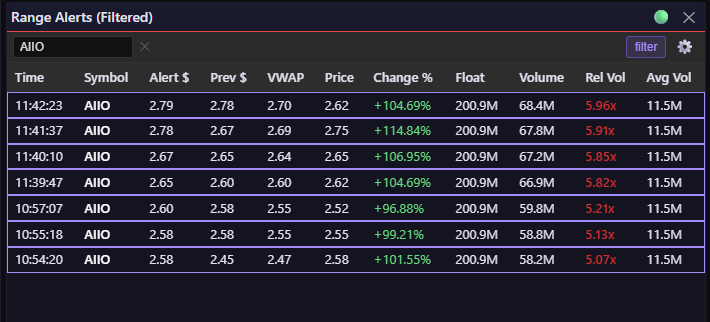
Screenshot: Use the Range Alerts widget in “filter” mode to get an alert when a specific ticker breaks HOD/LOD.
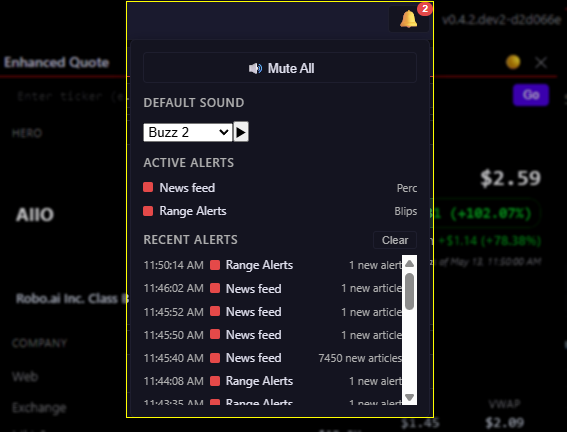
Screenshot: Global Alerts Manager showing active alert configs for two widgets, plus the recent-alerts log.
About the 14 sounds
The sound library is 14 short samples — snare, hi-hat, clap, marimba, steel pan, a snap, a blip, a buzz, and a handful of friends. Nothing fancy. Just percussion and synth hits I produced on my Native Instruments Maschine.
They’re simple, but they’re mine. More importantly, they’re distinctive — each one cuts through ambient noise and sits in its own corner of the spectrum, so when one fires you don’t have to look at the alert log first. When you hear it, you already know what fired. For example: You hear the marimba and you already know it’s the Range Alert. You hear the steel pan and you know it’s news on the watchlist.
I could have grabbed a free SFX pack off the internet. The Maschine wasn’t the efficient path. It was the fun one, and it gave me a palette I could tune — pick sounds that don’t collide, don’t fatigue, and don’t make me want to throw my monitor out the window during a busy session.
This is the part of side projects nobody bills you for: the small choices that make a thing yours. Sometimes that’s the whole point.
Key Takeaways
- Debuggability as a first-class feature: If your bugs can’t leave tracks, fix that before you fix anything else.
- Build the export/import feature early. Use it religiously.
- And, if you’re going to break your users, do it while the version number still starts with a zero.
Now go open that bell icon. There’s a marimba in there with your name on it.